Introduction
You've decided to venture into developing your own script, plugin, or custom application: excellent choice! This guide is designed to cover all aspects of this journey. While some descriptions might seem obvious to seasoned professionals, this manual is crafted to assist novice developers who are just starting out.
Who is this manual for?
The Developer Manual caters to developers interested in utilizing custom scripts within SeaTable, creating their own plugins, or developing custom programs. Both minimal programming skills and knowledge of SeaTable are therefore recommended to take full advantage of this manual.
Tips for beginners
You don't feel familiar enough with coding or with SeaTable? Depending on your actual skills, knowledge and aims, here are some suggested starting points:
-
You would like to get started but currently have no programming knowledge? We invite you to consult the Coding for beginners page
-
You are new to SeaTable? Do not hesitate to consult SeaTable's user manual to get more familiar with it.
Scope of this manual
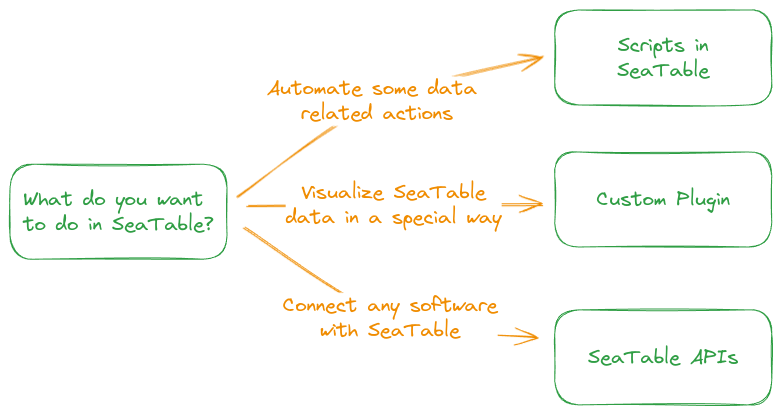
This guide illustrates three fundamental approaches to development within SeaTable:
- Scripting within SeaTable: Create custom logic or perform individual data processing using JavaScript or Python, both supported within SeaTable.
- SeaTable plugins: Develop plugins capable of interacting with, visualizing, and operating on data within a SeaTable Base.
- Utilizing any programming language with SeaTable's API: Seamlessly interact with the SeaTable API to construct your own web pages or programs.
JavaScript or Python scripts?
Differences between JavaScript and Python (in terms of abilities and requirements) are mentioned in the Scripting introduction page to help you make the right choice depending on your needs
All instructions provided are applicable to self-hosted SeaTable installations (Enterprise and Developer Editions), as well as to SeaTable Cloud.
Where to start?
For guidance on choosing the right section within this manual, refer to the decision tree diagram below.
If you aim to integrate a software product with SeaTable, note that SeaTable supports multiple workflow automation tools such as n8n, Zapier, and Make. Please refer to the SeaTable User Manual for detailed information on these integrations, as they are not covered here.
Requirements
Development system
To begin your development journey with SeaTable, you'll need a SeaTable system. If you're planning to create short scripts, SeaTable Cloud could be a suitable option. However, for more in-depth development or when creating plugins, it's highly recommended to set up your own SeaTable Server. Refer to the Admin manual for installation instructions.
Known limitations of SeaTable Cloud
- Custom Plugin Installation: SeaTable Cloud does not support the installation of custom plugins.
- Python Script Runs Limitation: The number of Python script runs is constrained by your current SeaTable Cloud subscription.
Therefore, it's recommended to set up your own SeaTable Server if you intend to develop custom plugins, applications, or run multiple Python scripts. For further information about deploying your server, please refer to the Admin Manual.
Authentication
The actual authentication depends on the development approach one chooses.
JavaScript scripts does not require any authentication at all because these scripts are executed in the browser of the user and the user has to be authenticated already.
Python scripts require an authentication to get data from the base, but the context objects contains everything for an easy authentication.
Plugins interact with the data of one base. SeaTable provides all required functions for easy authentication.
If you want to build your own application you always have to authenticate with a base token against the base (learn more about the different tokens used by SeaTable in the API Reference).
Data model
As a developer you typically interact with a single base. In SeaTable, a base can contain multiple tables, each one containing multiple rows and columns (or fields) and eventually multiple views used to filter, sort and/or group these rows and columns. The logic is like this:
SeaTable Base
├─ Table 1 (Column A | Column B | Column C)
│  └─ View A (Column A | Column B | Column C)
|     └─ Row 1
|     └─ Row 2
|     └─ Row 3
|     └─ ...
│  └─ View B (Column A | Column C)
|     └─ Row 3
|     └─ Row 4
└─ Table 2
|  └─ ...
Every objects and methods will help you interact with this architecture. For details about the different objects (tables, view, rows & columns and links) you can look at the global structure presented in each object page or at the SeaTable API Reference for even more information.